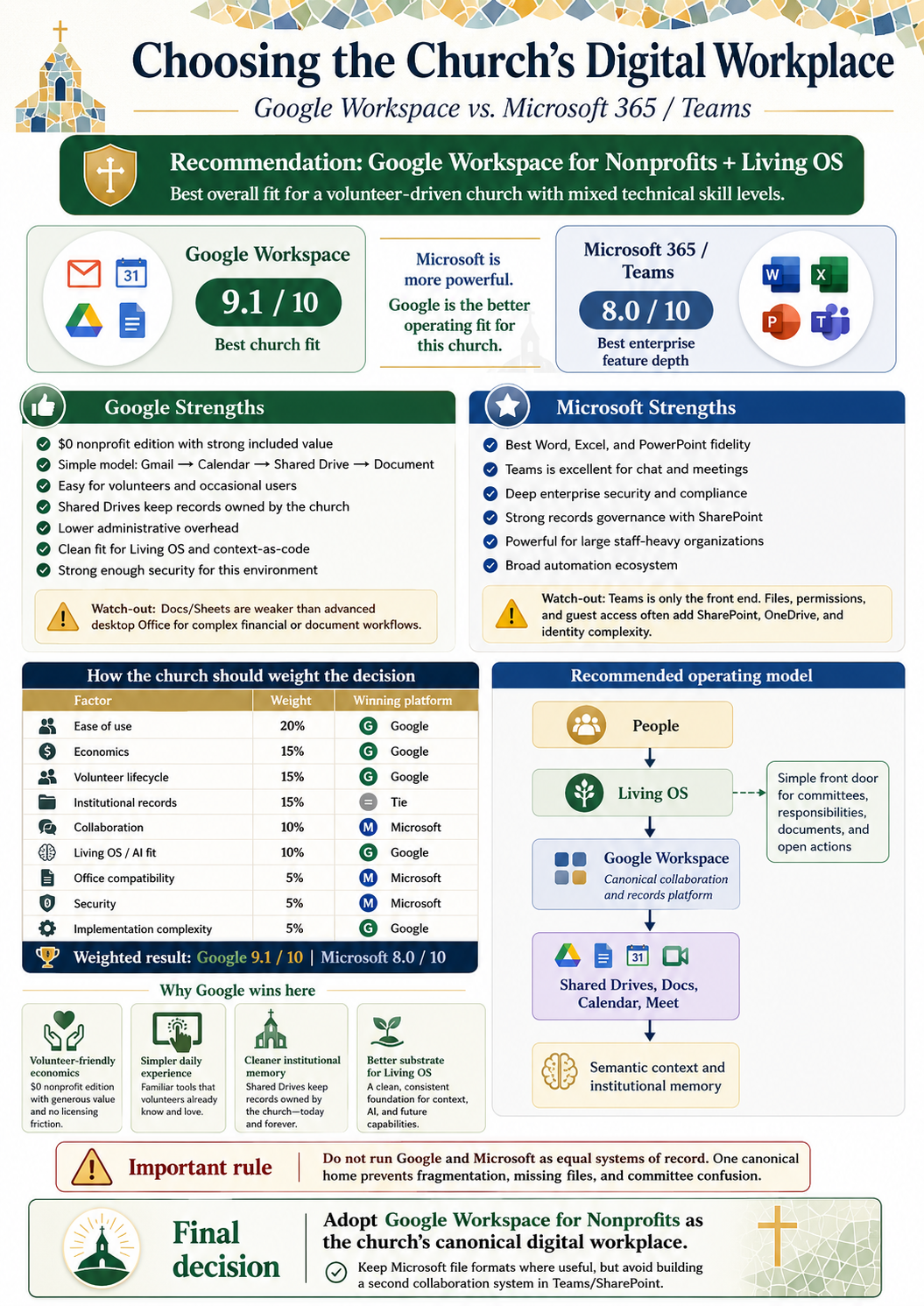
Google Workspace for Nonprofits vs. Microsoft 365 / Teams, evaluated for the way a volunteer-driven church actually operates, not for the size of the vendor feature catalog.
The recommendation is straightforward: adopt Google Workspace for Nonprofits as the church’s canonical digital workplace and institutional-record substrate. Use the Living OS as the simplified human-facing front door and semantic-memory layer. Preserve Microsoft Office formats where Word, Excel, or PowerPoint provide a genuine functional advantage, but do not operate Microsoft 365 and Teams as a competing system of record.
That is not a claim that Google is technologically better than Microsoft. Microsoft is arguably the more powerful enterprise toolbox. Google is the better operating foundation for this institution.
The distinction matters because the church is not buying a feature contest. It is choosing the environment in which volunteers, rotating committee members, staff, and future leaders will find one another’s work, preserve organizational records, and carry decisions forward without depending on whoever happens to remember where everything lives.
The decision
Choose the platform that creates the least organizational friction while preserving institutional ownership, security, continuity, and room for better tools around the edges.
The church’s dominant constraints are volunteer turnover, mixed technical ability, older and occasional users, limited administrative capacity, organizational ownership of records, and the steady loss of institutional memory when leadership changes. Those constraints are more important than the maximum capability of the office suite.
Google Workspace fits that operating profile well. Gmail, Calendar, Shared Drives, Docs, Sheets, Slides, Meet, Forms, and Groups form a relatively legible collaboration model. Shared Drives can be organized around durable functions rather than people, and access can follow role-oriented groups instead of being rebuilt one person at a time.
Microsoft 365 is stronger where the institution can operate its deeper machinery. Advanced Word, Excel, and PowerPoint remain genuine advantages. Teams provides richer persistent chat and channel collaboration. Entra ID, Conditional Access where applicable, Intune, Defender, Purview, advanced SharePoint governance, device administration, records management, and enterprise compliance create a formidable managed environment.
Those strengths deserve respect. They do not erase the administrative cost of operating them.
Google wins the church decision. Microsoft wins several technical categories.
A credible recommendation should show where the alternative is genuinely better, then weight those advantages against the organization’s actual needs.
Google Workspace
Google offers the lower-friction daily model for volunteers and occasional users. Shared Drives make church-owned records easier to distinguish from personal material. Groups provide a direct way to connect access to committees and roles. The nonprofit economics are strong, and the resulting corpus is a clean substrate for the Living OS and context-as-code.
Microsoft 365 / Teams
Microsoft offers superior desktop Office depth, stronger persistent team chat, more sophisticated identity and endpoint controls, advanced compliance tooling, and a richer enterprise administration stack. A staff-heavy organization with dedicated IT administration, centrally managed Windows devices, complex Office workflows, or demanding compliance requirements could reasonably reach a different conclusion.
The actual church-fit question
The decision is not whether Microsoft can do more. It can. The decision is whether the church benefits enough from that additional power to justify the operating complexity it introduces for administrators and volunteers.
For the church’s current profile, it does not. Google is strong enough in the categories where Microsoft wins and materially better aligned with the categories that determine whether the system will remain usable after the implementation team leaves.
Weighted church-fit model
The following scorecard is a decision model created for this institutional profile. It is SharePlane analysis, not a vendor benchmark, an external measurement, or a universal ranking.
| Decision factor | Weight | Google Workspace | Microsoft 365 / Teams | Church-fit result |
|---|---|---|---|---|
| Ease of use | 20% | 9 | 7 | |
| Economics | 15% | 10 | 8 | |
| Volunteer lifecycle | 15% | 9 | 6 | |
| Institutional records | 15% | 9 | 9 | Tie |
| Collaboration and chat | 10% | 8 | 10 | Microsoft |
| Living OS and AI fit | 10% | 10 | 8 | |
| Office compatibility | 5% | 8 | 10 | Microsoft |
| Security | 5% | 8 | 10 | Microsoft |
| Implementation complexity | 5% | 10 | 6 |
The weighted result is approximately Google Workspace 9.1 / 10 and Microsoft 365 / Teams 8.0 / 10. The result says that Google is the better fit for this church’s present priorities. It does not say that Google is the better platform for every church, nonprofit, or enterprise.
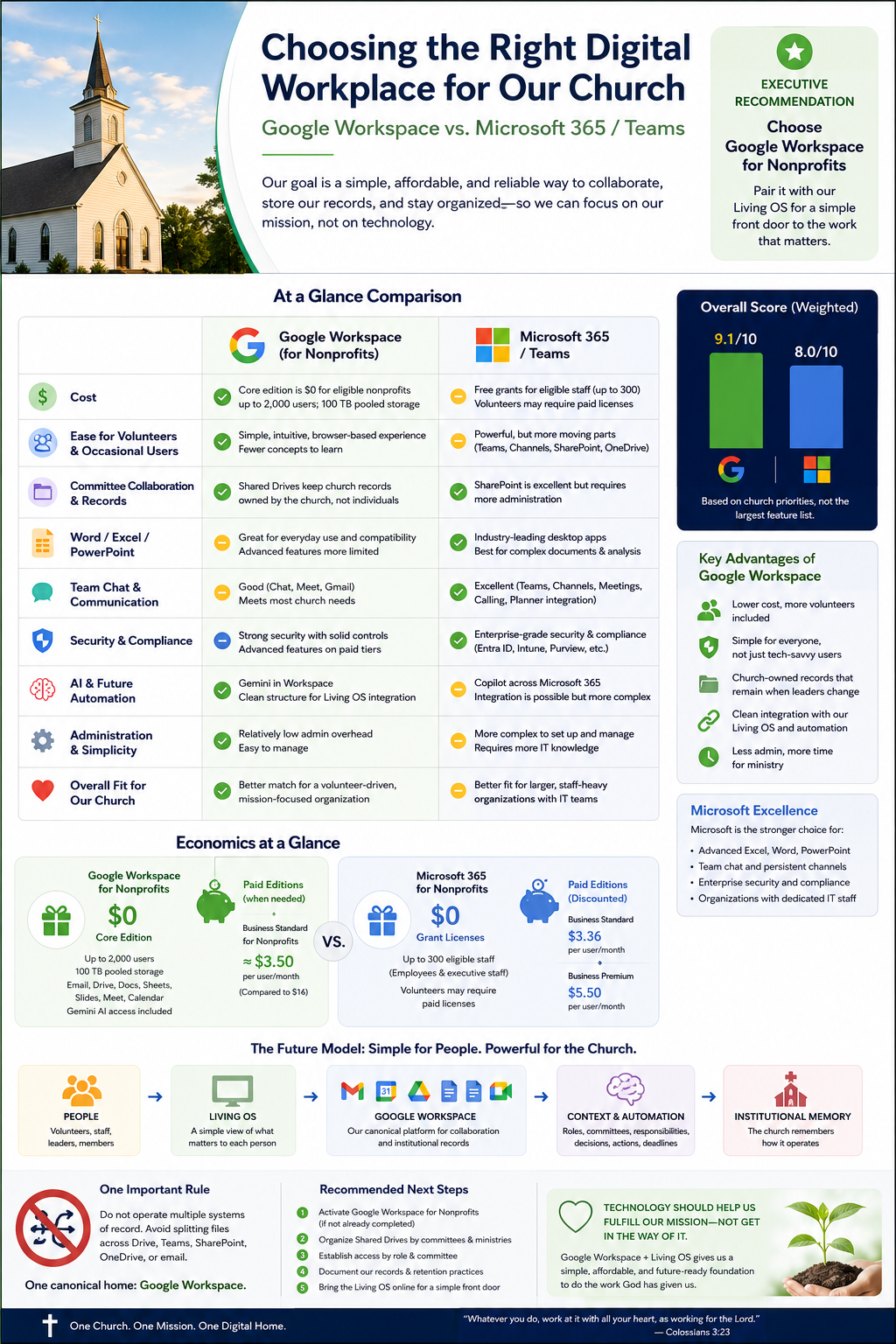
Both vendors are generous to nonprofits. Google’s model fits a volunteer-heavy church better.
Google states that qualifying organizations can receive Google Workspace for Nonprofits at no charge. Its current nonprofit documentation describes Gmail, Calendar, Drive collaboration, Meet, Shared Drives, 100 TB of pooled storage, Gemini capabilities, and support for up to 2,000 users. New nonprofit accounts begin with a 300-user limit and can request an increase.
Google also advertises a discounted nonprofit Business Standard tier at approximately $3.50 per user per month when the organization needs deeper capabilities. The no-cost edition is already unusually strong for a volunteer-heavy church, which means the institution can establish one canonical home without first turning every occasional participant into a paid seat.
Microsoft’s current nonprofit staff pricing is also generous. Microsoft 365 Business Basic is offered as a grant for up to 300 eligible users, while Business Standard and Business Premium are currently listed at nonprofit prices of $3.36 and $5.50 per user per month, paid yearly.
The important complication is license eligibility. Microsoft distinguishes grant eligibility for paid employees and unpaid executive staff from discounted licensing available to other volunteers. Members, donors, and beneficiaries are not eligible simply because they are connected to the organization. Microsoft also expects nonprofits to maintain at least 85 percent active usage across granted licenses, with active use measured through access to a cloud workload during the preceding 90 days.
That is manageable in a professionally administered environment. It is less elegant for a church where committee participation rotates, many volunteers engage occasionally, and the administrative goal is to reduce license choreography rather than make it a permanent operating function.
Familiar Office applications do not automatically make Teams simpler.
Word and Excel are familiar to many people. Teams is a different proposition. Microsoft collaboration commonly introduces Teams, channels, SharePoint, OneDrive, groups, identities, guest access, and permissions. That is excellent enterprise architecture. It is also architecture ordinary volunteers should not have to understand.
The Google mental model can remain comparatively legible:
Gmail → Calendar → Shared Drive → Document
The Microsoft mental model has more layers:
Teams → Team → Channel → SharePoint → document library or OneDrive → identity and permissions
Users do not need to know every layer, but administrators eventually do. In a lightly staffed institution, hidden complexity becomes somebody’s Saturday problem.
This does not make Teams bad. It means the organization should not confuse familiarity with Word or Excel with the operating simplicity of the Microsoft collaboration stack.
Do not undersell the alternative.
Microsoft is the stronger choice in several categories, and the recommendation should remain honest about them.
Desktop Office
Advanced Excel models, complex Word documents, and sophisticated PowerPoint work remain clear Microsoft strengths. Google’s browser-based tools are excellent for ordinary collaboration, but they do not replace every specialized Office workflow.
Teams collaboration
Persistent chat, channels, meetings, calling, Planner integration, and day-to-day team coordination are stronger in Microsoft’s collaboration environment. A staff team living in Teams all day may reasonably value that integrated conversational layer more heavily than a volunteer committee does.
Enterprise controls
Entra ID, Intune, Defender, Purview, Conditional Access, device management, information protection, advanced records controls, and sophisticated SharePoint governance are materially stronger in a professionally administered Microsoft environment.
If the church becomes staff-heavy, centrally manages a fleet of Windows devices, depends on advanced desktop Office workflows, develops sophisticated compliance requirements, or establishes dedicated IT administration, the decision should be reconsidered. Architecture should follow reality, not become a permanent doctrine.
The Living OS changes what the office suite needs to do.
Neither vendor inherently understands how this church operates. They store documents, messages, calendars, identities, and meetings. The Living OS connects those artifacts to organizational meaning.
- People and roles
provide the accountable human context.
- The Living OS
provides a simple front door organized around work rather than storage topology.
- Google Workspace
provides the canonical collaboration and evidence substrate.
- The semantic and context layer
connects records to committees, authority, responsibilities, decisions, and current state.
- Institutional memory
preserves why the church operates as it does and what needs attention next.
Workspace provides evidence: minutes, agendas, financial reports, policies, contracts, calendars, forms, decisions, correspondence, and working documents.
The Living OS provides understanding: committees, roles, authority, responsibilities, deadlines, provenance, open actions, required work, and continuity.
A committee member should eventually open a simple experience and see my committee, next meeting, current agenda, latest minutes, current financial information, responsibilities, required annual work, open actions, decisions, and documents needing attention. That person should not need to understand Shared Drive topology, SharePoint architecture, or the graph model beneath the experience.
The office suite is infrastructure. It is not the intended final user experience.
The article is a graph, not merely a page.
The recommendation becomes more durable when the relationships behind it are explicit.
- Mission and governance
establish why the institution exists and what authority governs it.
- People and roles
identify who is accountable.
- Committees and responsibilities
turn governance into recurring work.
- Workspace evidence
records meetings, documents, decisions, and actions.
- Living OS context
connects the evidence to meaning and current state.
- Institutional memory
preserves continuity across leadership transitions.
- Mission outcomes
keep the architecture subordinate to service.
The typed relationships are equally important: a document provides evidence; a meeting produces a decision; a role governs access; and a requirement becomes observable state. The article itself is authored by Tony Malott and participates in the existing SharePlane relationship graph.
This is why the file is not the whole knowledge object. The relationships allow the institution to ask not only where a document is, but what it proves, who governs it, what decision it records, and what responsibility follows from it.
One canonical home. One simple front door.
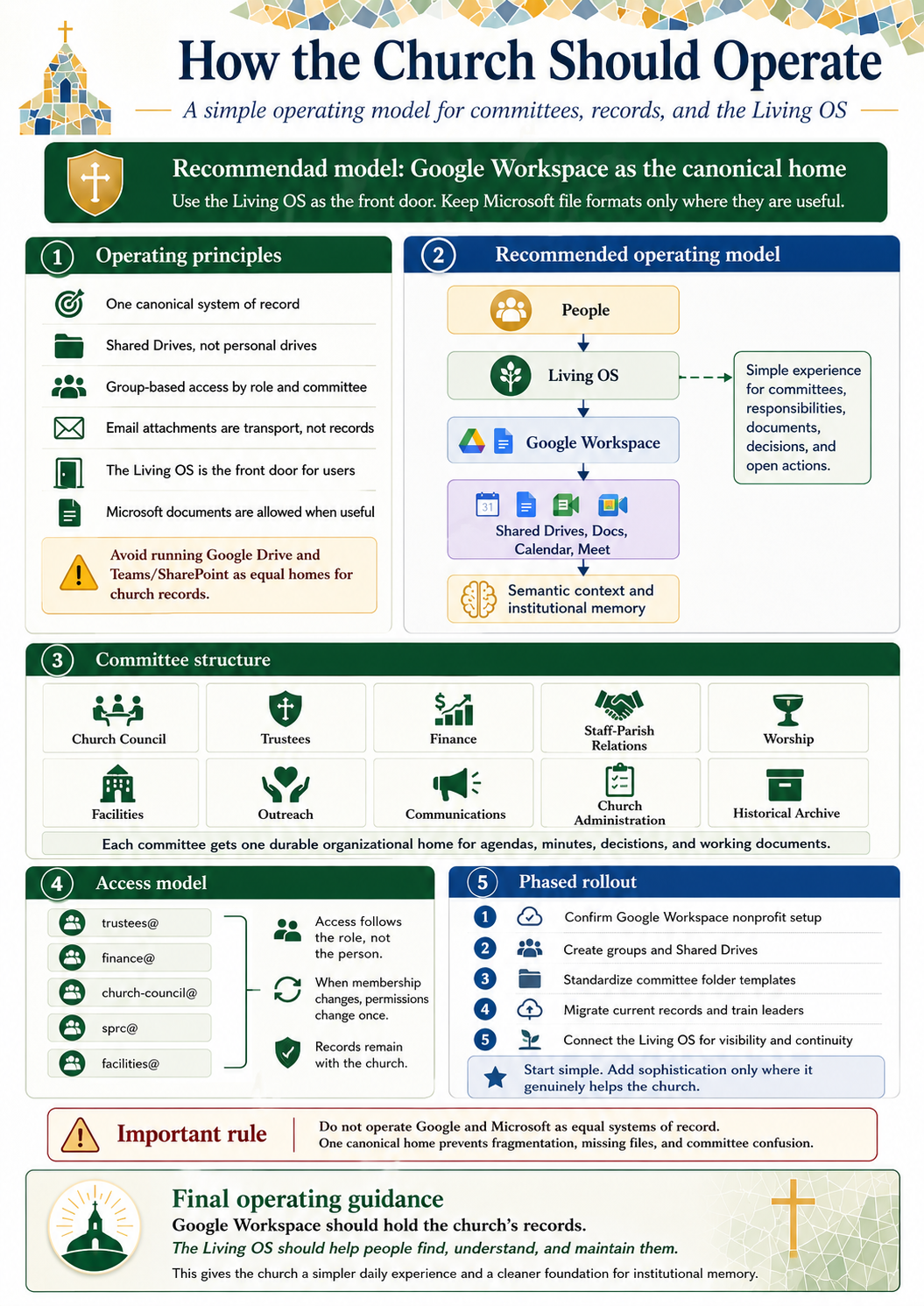
The canonical collaboration substrate should be Google Workspace for Nonprofits. Durable Shared Drives should map to functions rather than people.
Representative Shared Drives include:
- Church Governance
- Church Council
- Trustees
- Finance
- Staff-Parish Relations
- Worship
- Missions and Outreach
- Facilities
- Communications
- Programs and Ministries
- Church Administration
- Historical Archive
Role-oriented Groups can include trustees@, finance@, church-council@, sprc@, facilities@, and worship@. When committee membership changes, group membership changes once and access follows the role.
The operating rules should be simple enough to remember:
- Organizational records live in Shared Drives.
- Personal My Drive is not the authoritative home for permanent church records.
- Email attachments are transport, not authoritative records.
- Access follows role and group membership where practical.
- Word, Excel, and PowerPoint formats remain allowed where useful.
- Google and Microsoft must not become equal competing systems of record.
The two-system trap recreates fragmentation.
A church can make every individual technology decision sound reasonable and still produce a bad institutional architecture:
- Email → Google
- Calendar → Google
- Some files → Drive
- Chat → Teams
- Other files → SharePoint
- Personal material → OneDrive
- More records → email attachments
The result is not flexibility. It is a distributed search problem with unclear ownership, duplicated records, conflicting permissions, and committee confusion.
The principle is one canonical institutional corpus. Multiple useful tools and projections may operate around it, but they should not create multiple equal answers to the question, “Where does the church’s record live?”
Microsoft file formats can remain part of the corpus. A complex financial model can still be an Excel workbook, and a polished presentation can still be a PowerPoint file. The file format is not the system of record.
Start boring. Earn sophistication.
The rollout should begin with the least glamorous work because that is where institutional continuity is won.
- Confirm the Google Workspace for Nonprofits setup and accountable administrators.
- Create role-oriented Groups and durable Shared Drives.
- Standardize a small committee folder pattern for agendas, minutes, decisions, financial information, and working documents.
- Move current authoritative records into the organizational corpus and train leaders on the operating rules.
- Connect the Living OS to provide visibility, context, responsibilities, and continuity.
Do not begin with a giant automation program. Begin by making ownership and location unambiguous. Add sophistication only where it genuinely helps the church.
The whole argument on one page.
The leadership summary is intentionally redundant with the publication. It can be displayed in a meeting, printed, or circulated by itself without losing the central logic.
The short version is this: Google provides the simpler and more economical canonical home for this church. Microsoft remains the stronger enterprise toolbox in several categories. The Living OS should make the suite recede into infrastructure by presenting people with meetings, responsibilities, records, decisions, and open actions instead of storage topology.
One canonical home prevents fragmentation. One simple front door makes the system usable.
Current vendor facts used in this evaluation
The evidence cutoff for the current program and pricing facts is August 30, 2026.
Vendor fact
The Google and Microsoft nonprofit program, eligibility, user-limit, storage, included-service, pricing, and grant-usage statements in this article are externally verifiable vendor facts. They are supported by the public-safe source register attached to this Work.
SharePlane analysis
The recommendation that Google is the better operating substrate for this church, the warning against competing systems of record, and the Living OS architecture are SharePlane analysis grounded in the institution’s operating profile.
Weighted church-fit model
The 9.1 and 8.0 scores are an analytical model created for a volunteer-heavy church. They are not externally measured facts and should not be presented as universal product rankings.
Pricing, eligibility, and nonprofit program terms can change and must be rechecked before procurement or licensing decisions.
The recommendation
Adopt Google Workspace for Nonprofits as the church’s canonical digital workplace and institutional-record substrate. Use the Living OS as the simplified front door and semantic-memory layer. Preserve Microsoft Office formats where they provide a real advantage, but do not build a second collaboration and records system around Teams, SharePoint, and OneDrive.
Microsoft is arguably the more powerful enterprise toolbox. Google is the better operating foundation for this institution.
The goal is not to make the church think more about technology. The goal is to give people a simple, affordable, and durable way to collaborate, preserve records, understand responsibilities, and carry the mission forward without technology getting in the way.
---
Sources
- Google for Nonprofits Help, Google Workspace for Nonprofits: https://support.google.com/nonprofits/answer/2858465?hl=en
- Google for Nonprofits Help, AI features and nonprofit Workspace offers: https://support.google.com/nonprofits/answer/16345471?hl=en
- Microsoft, Microsoft 365 nonprofit plans and pricing: https://www.microsoft.com/en-us/microsoft-365/business/nonprofit-plans-and-pricing
- Microsoft, nonprofit eligibility: https://www.microsoft.com/en-us/nonprofits/eligibility
- Microsoft Learn, grant usage and recurring notifications: https://learn.microsoft.com/en-us/industry/nonprofit/microsoft-for-nonprofits/grant-usage-recurring-notifications
Check the work, not just the conclusion.
Public research, authority, lineage, and author testimony are labeled separately. Sources can corroborate, challenge, or bound the argument; they do not replace Tony Malott's judgment.
Take the complete artifact with you.
The deterministic package contains a self-contained offline article, the exact public-route snapshot, canonical public metadata, receipt, source text when available, plain-text context, claim ledger, source records, and a member-hash manifest.
Sources, authority, and lineage
Each record states the role it plays. Research support and governance provenance are not treated as interchangeable.
Google Workspace for Nonprofits
No-cost nonprofit offer, users, pooled storage, Shared Drives, and included services.
No-cost nonprofit offer, users, pooled storage, Shared Drives, and included services.
Open sourceAI features and Google Workspace nonprofit offers
Gemini availability and paid nonprofit Workspace offer.
Gemini availability and paid nonprofit Workspace offer.
Open sourceMicrosoft 365 nonprofit plans and pricing
Business Basic grant, Business Standard and Business Premium nonprofit pricing, and plan capabilities.
Business Basic grant, Business Standard and Business Premium nonprofit pricing, and plan capabilities.
Open sourceMicrosoft nonprofit eligibility
Grant and discount eligibility, user classes, restrictions, and utilization expectation.
Grant and discount eligibility, user classes, restrictions, and utilization expectation.
Open sourceGrant Usage and Recurring Notifications
85 percent active-use threshold and 90-day cloud-workload activity definition.
85 percent active-use threshold and 90-day cloud-workload activity definition.
Open sourceIssue #670 owner authority for Choosing the Church’s Digital Workplace
Owner semantic, creative, evidence-boundary, relationship, and implementation authority; not independent vendor corroboration.
Owner semantic, creative, evidence-boundary, relationship, and implementation authority; not independent vendor corroboration.
Open sourceWhat is asserted—and how it is bounded
Research, author analysis, and personal testimony remain distinct. Supporting links and caveats stay attached to each claim.
Public boundary. Public-safe institutional-design research for the First UMC Sacramento operating context. It does not identify or criticize a local individual, expose private church records or confidential financial information, or encode a disguised stakeholder grievance.
Continue the thinking
Each connection explains why the next work belongs here. The graph records the edge; this layer makes it useful to a reader.
Foundations
Beyond the Agent
Beyond the Agent explains why abundant execution increases the importance of institutional authority, evidence, and continuity; this Work applies that architecture to a church digital workplace decision.
Frontier intelligence and execution are becoming abundant; institutional scarcity moves upward into coordination, verification, authority, human attention, current state, and trust.
The Semantic Operating System
The Semantic Operating System supplies the authority, provenance, relationships, state, and next-valid-action foundation that lets a Living OS become more than a friendlier folder browser.
A system becomes a semantic operating system when it preserves the governed conditions under which meaning remains identifiable, authoritative, explainable, movable, and actionable.